 Formbench
Managing your forms: new, copy, import and export
Switch between forms, start new ones, duplicate, delete, import a ServiceM8 form and export a backup.
Click the arrow next to the form name at the top of the builder to open the Forms menu.
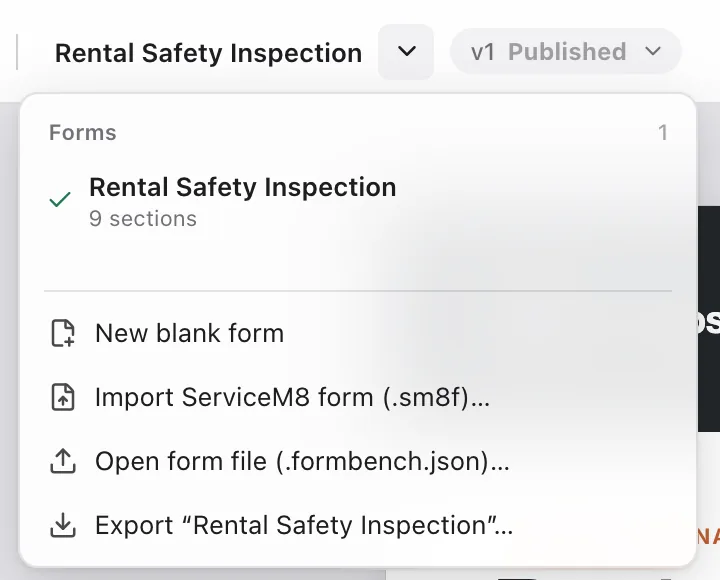
| Menu item | What it does |
|---|---|
| A form's name | Opens that form. When you have more than five forms, a search box appears at the top. |
| Duplicate (on a form) | Makes a copy called "(copy)". Good for a variation of a form. |
| Delete (on a form) | Deletes the form. It can't be undone, so export it first if you might need it. |
| New blank form | Starts an "Untitled form" with one section. |
| Import ServiceM8 form (.sm8f)… | Turns a form exported from ServiceM8 into a Formbench form. |
| Open form file (.formbench.json)… | Opens a form you exported from Formbench. |
| Export | Saves the form to your computer. Tick Include the sample answers or Embed images for one self-contained file. |
Importing a ServiceM8 form
- In ServiceM8, export the form you use now. You get a .sm8f file.
- In Formbench, open the Forms menu and choose Import ServiceM8 form (.sm8f)….
- Pick the file. Formbench tells you how many sections, pass/fail checks, photo groups and rules it brought across, and if any conditions couldn't be converted.
- Check the new form in the Form tab, design the report, then publish.
Yes / No / N/A questions become Pass / Fail / N/A checks, "hide when" conditions become answer rules, notes become long text and photo questions become repeating photo groups.
More in Building forms
A tour of the form builderThe five tabs of the builder, the forms menu, versions, undo and how your work is saved.Adding sections and questionsBuild the form a section at a time, add questions from the palette, and reorder everything by dragging.Question settings: required, help text and datesMake questions required, add help for the tech, hide them from the report, and phase in new checks from a date.Repeating groups: rooms, doors and alarmsAsk the same questions for every room, door or smoke alarm, and let the tech add as many as the job needs.